
Now you can see your store. Here's what to do about it.
Suppose you can now see it. Every product carries a live record — momentum against its own baseline, lifecycle state, rank, the surfaces it appeared on, where its traffic came from. The blind spot is closed.
From a wall of data to a decision
A previous piece argued that most stores run on a partial view — that the bestseller report, the analytics dashboard, and the stock count each describe the store as it was, in aggregate, after the fact, and that a live, per-product picture of demand falls into the gap between them. We called it the half of your store you can't see.
Here's the inconvenient truth about that: seeing it isn't the point. A merchandiser staring at a live, accurate, per-product feed for a two-thousand-product catalogue is, in one specific way, no better off than before — because now there's more to interpret, not less. The picture is only worth something if it tells you what to do. So this piece is about the second half: how demand intelligence turns the live picture into a specific recommendation — and, just as importantly, where that recommendation stops.
Raw signals are not insight. "This product's view velocity is up 2.4× on its three-hour baseline" is a true and useful fact, and it is also one of tens of thousands of true facts the system holds at any moment. A person cannot read tens of thousands of facts and act well. The job that closes the gap between seeing and doing is interpretation: reading each product's demand state and producing a single, specific answer to the only question that matters operationally — what should I do about this one, and how urgently?
That's what Flockr's advisory layer does. For every product where something meaningful is happening, it reads the demand state and surfaces a recommended action, derived automatically from the data already in the system. Not a dashboard to interpret — a recommendation, with the reasoning attached. It's the difference between a tool that reports and a tool you can run your day from.
The best way to show it is to follow one product.
A worked example: the jacket that's selling despite you
Take the product from the previous piece — a black softshell jacket. Its live record reads: trending-new and accelerating, view velocity up 2.4× on its own three-hour baseline, add-to-bags up 3.1× in the last hour, risen to #3 in outerwear this week. By any reading, a product doing well.
But one signal in that record changes what it means: most of its product-page views are arriving straight from external links, and it appears on just one of five internal merchandising surfaces. The demand is real and climbing — and it's coming from everywhere except your own store.
Flockr reads that combination and surfaces it as an insight, grouped with the other products in the same situation:
9 products gaining demand your store isn't surfacing. 72% of demand arriving from outside your store. Appearing on 1 of 5 merchandising surfaces.
And against it, a specific recommendation:
Feature now — Merchandising. Add these to your outerwear PLP and homepage recommendations. They're discovered off-site and climbing on their own; featuring them internally is the highest-leverage move you're not making.
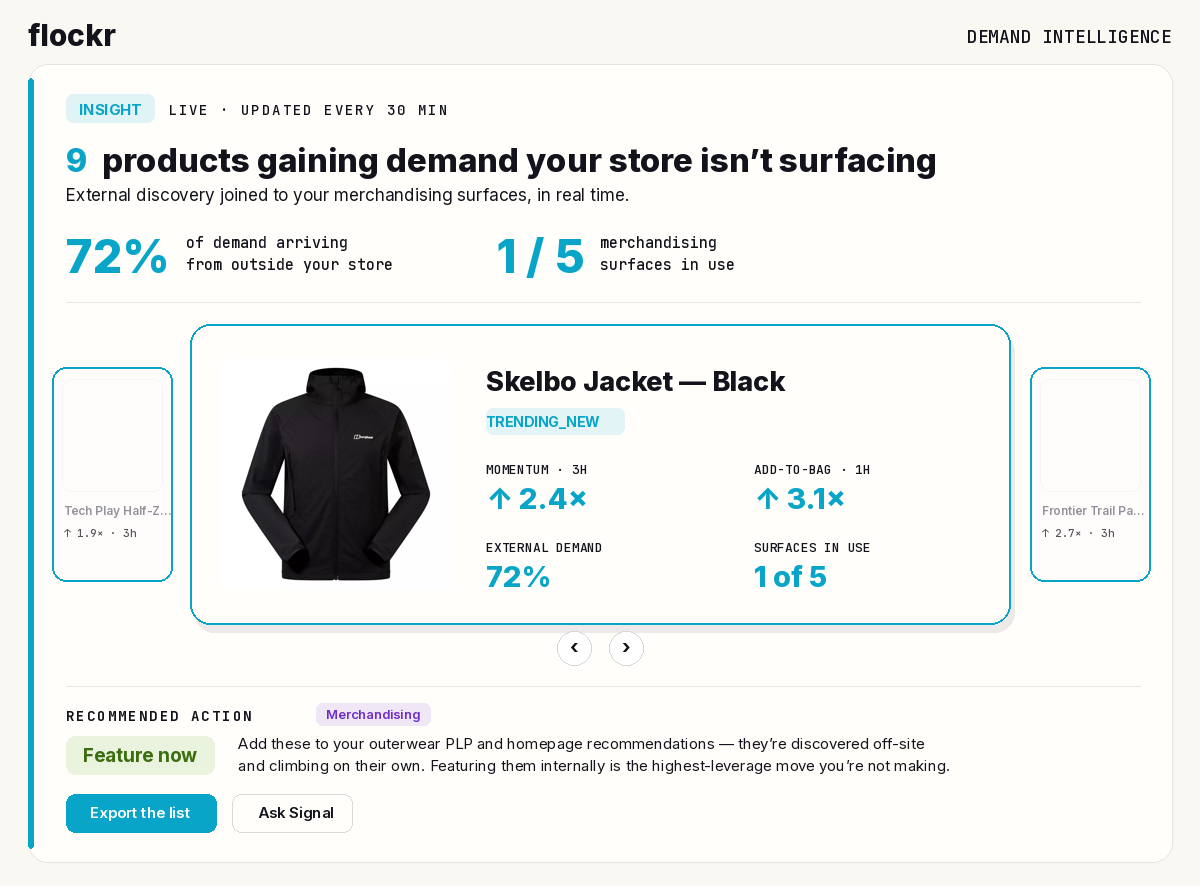
The recommendation is worth more than the data it came from, because of the reasoning it carries. The naïve read of this product is "it's popular — feature it," which is fine but obvious. The actual insight is sharper and slightly uncomfortable: you are not creating this demand, you are missing it. The shopper interest already exists; the one lever you control — where the product appears on your own store — is the one going unused. That's a conclusion no single tool could reach, because it requires joining live demand to internal surface coverage in real time. It's exactly the kind of thing the previous piece promised the live picture would reveal — and here it is, turned into something you'd act on this morning.
Where the advice stops — and you begin
Here is the part to be precise about, because it defines what Flockr is.
Flockr surfaces that recommendation, routes it to the team that owns the decision — Merchandising, in this case — and lets you work it: accept it, assign it, comment on it, mark it done. What Flockr does not do is reach into your merchandising system and feature the product itself. It tells you what to do, in priority order, with the reasoning and the specific surfaces named. The action — the actual placement on the PLP and the homepage — happens where it always has: in your stack, by your team or the systems they run.
This is deliberate, and it's the whole design. Flockr is the intelligence layer, not the action layer. It produces the best real-time read of your store and the clearest advice on what to do with it; it does not try to be your merchandising tool, your inventory system, or your CMS. Those each do their job; Flockr gives all of them the demand picture none of them has, and gives your team the prioritised, reasoned recommendation to act on. The advice is the product. Executing it is yours.
One honest aside, so the line is clean: the single thing Flockr does activate on its own is its own storefront messaging — a product that qualifies for, say, a popularity message gets one automatically, by design. That's Flockr's native surface, not Flockr acting inside someone else's system. Every operational recommendation beyond that is advice you carry out in your stack.
The same logic, across the catalogue
The jacket is one situation; the advisory layer reads all of them, and the strength of it is that the recommendations come from one consistent logic rather than a person's interpretation varying product to product. A few of the patterns it acts on:
A product accelerating across both short and sustained timeframes — momentum elevated at three hours and over seven days — earns a Feature now: this isn't a spike, it's a build, and it's worth amplifying before the curve flattens. A product whose views are fading but whose purchases are holding earns a Promote — counterintuitively, the falling views are the signal, because a product still converting the visitors it gets has an audience and simply needs visibility. A product that dropped sharply within a day or two of its peak earns an Investigate rather than any commercial action — a sudden cliff usually has an external cause, and reacting commercially before understanding it is a mistake.
In every case the shape is the same: read the demand state, produce one specific recommended action, attach the reason, route it to the team that owns it. One product, one clear next move, derived from the data — not a chart to puzzle over.
From a catalogue to a morning briefing
Put together, this changes what opening the portal is. Instead of a merchandiser interpreting two thousand products and a wall of live metrics, they open to a ranked, reasoned set of recommendations: the products to feature today, the ones to promote, the ones to investigate — each with the why, and a one-step route to act or hand off. The advisory layer turns a reporting tool into an operational one: a daily commercial briefing that tells your team where their attention is worth the most, before they've read a single table.
That's the second half of the story the previous piece started. First you couldn't see your store. Now you can — and the part you couldn't see has become the part that tells you, every morning, exactly where to act. Flockr reads it; you run it.
If you'd like to see the advice it would surface on your own catalogue, book a walkthrough — we'll run it live on a store like yours.