
"Back in stock" only works if it's now
The most welcome message on any storefront is also the one almost no store shows — because the moment it becomes true is invisible. A restock isn't a state you can read; it's a crossing you had to see happen. Here's how Flockr catches it, in full.
A previous piece walked through how Flockr makes "low stock" honest — the live, per-variant inventory truth behind "Only 3 left." This is the promised other half of that story: what happens when the stock comes back.
"Back in stock" is an unusual social proof message. Most storefront messages are trying to persuade; this one is answering a wish the shopper already had. Somebody wanted the product, found it gone, and left. Telling them it's returned isn't pressure — it's genuinely good news. Shoppers are glad to see it.
And yet almost no store says it. Not because merchants don't care, but because of something structural: the moment a restock becomes true is invisible. This post is about that invisibility, and the machinery it takes to defeat it — because as with the low-stock piece, the detail is the point. Anyone can render the words "Back in stock." Knowing when they're true is the hard part.
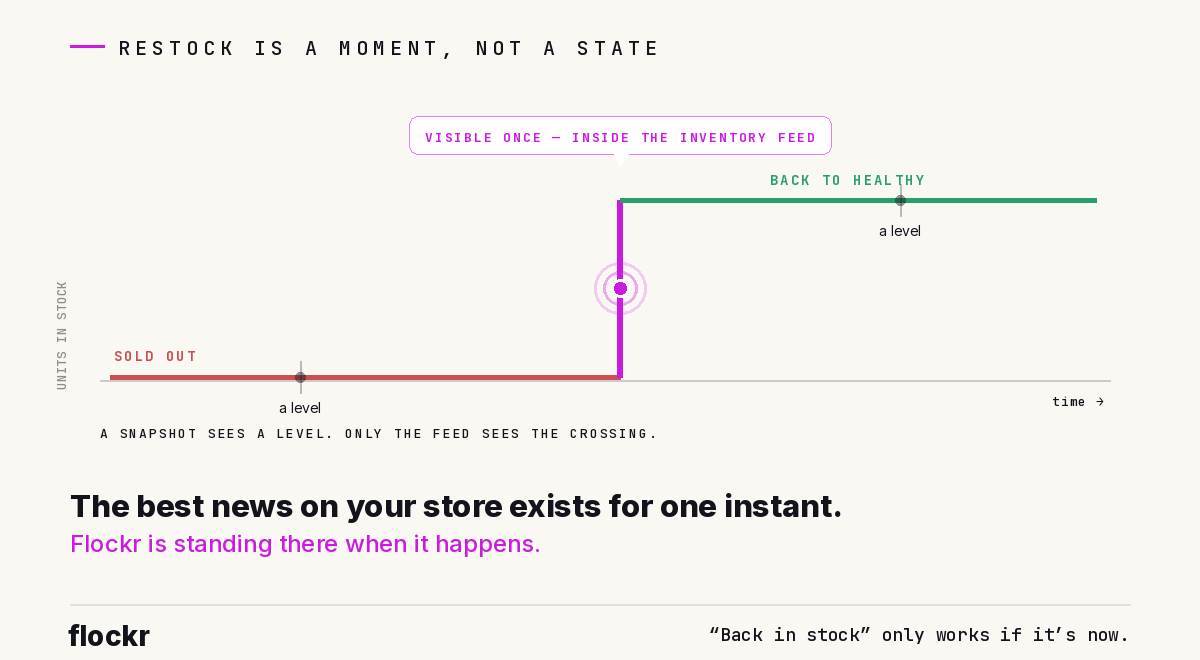
A restock is a moment, not a state
Here's the structural problem. Nearly every signal Flockr computes is a level signal — it looks at the current state of a product and asks "is this true right now?" Is stock low? Is demand accelerating? Is it a bestseller? All answerable from the present.
Restock is different in kind: it's a transition. You cannot tell that a product was restocked by looking at it today — a healthy stock level is just a healthy stock level. The fact of a restock lives entirely in the relationship between where the product is and where it was: it crossed from empty, or nearly empty, back to health. No snapshot contains that. You had to see the crossing.
And the crossing is fleeting. Flockr's picture of a product's stock is real-time and always overwritten — every inventory update replaces the previous summary with the current one. By the time a shopper loads a page, the previous stock position is gone. There is exactly one instant where the transition is visible: inside the inventory update handler, between reading the product's old stock summary and writing the new one.
So that is where detection lives. Each time an inventory update arrives, Flockr compares the product's previous overall state to its new one — with both the before and after picture in hand — and if the product has just crossed back into health, it stamps a small record onto the product: when the crossing happened, and where it came from. The messaging pipeline never has to reconstruct the past. It just reads the stamp.
All the judgement about whether a restock really happened is made once, at the moment of truth.
Two comebacks, two messages
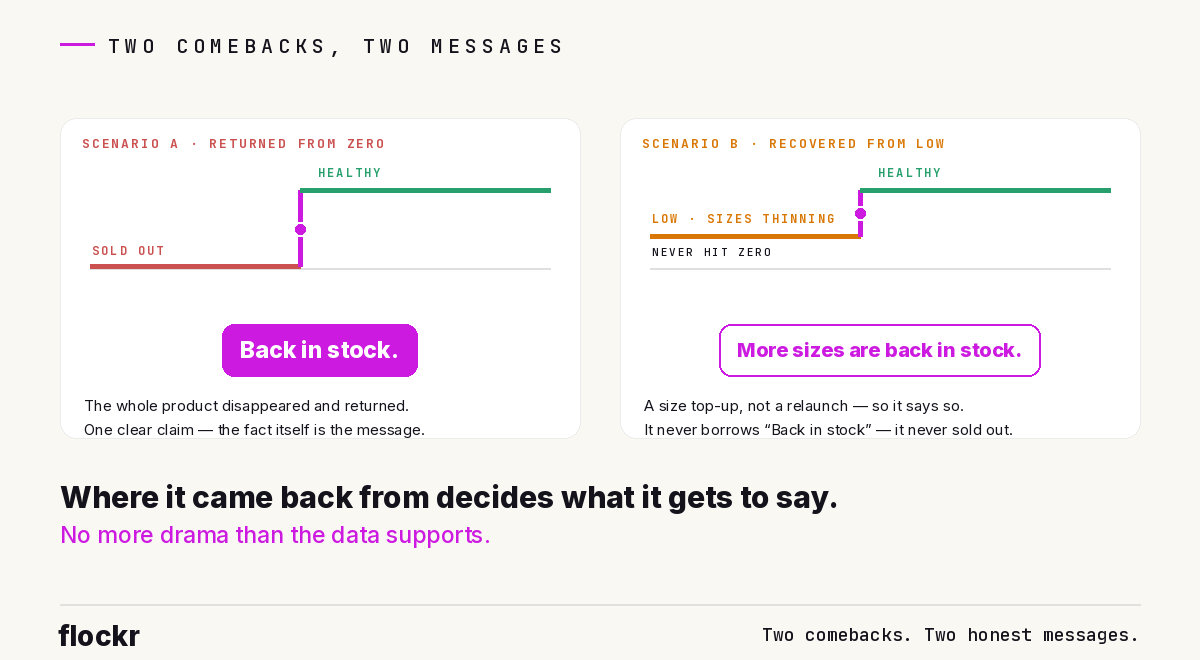
Not all returns are the same story, and the stamp's "where it came from" decides what the shopper is told. "Healthy," throughout, means the same variant-aware verdict the low-stock piece described — the product has stock, and the ratio-based low flag is off.
Scenario A — back from out of stock. The product previously had nothing buyable at all, and now it's healthy. This is the strong story: the whole product disappeared and returned. It earns the strong message — "Back in stock." One clear claim, no counts, no qualifiers. The fact itself is the message.
Scenario B — back from low stock. The product was flagged low — typically because its popular sizes were nearly gone — and has now recovered to health. This is the softer story: usually a size replenishment, not a relaunch. So it gets the softer message — "Restocked," worded in a size-aware way. And it deliberately never says "Back in stock," because the product never actually hit zero. Where the comeback came from decides what it gets to say; Flockr doesn't claim more drama than the data supports.
Within Scenario B, the wording then follows the same most-specific-still-truthful ladder as low stock, reading the live variant picture and describing what actually improved: "More sizes are back in stock" when several sizes are now comfortably available, "Sizes have been restocked" for a broader multi-size product, "Restocked — only 6 available" for a single-option product back to a small, concrete count (good news paired with honest scarcity when the real number is known), and a plain "Restocked" when there's no useful detail to add.
The imposters: three things that look like a restock and aren't
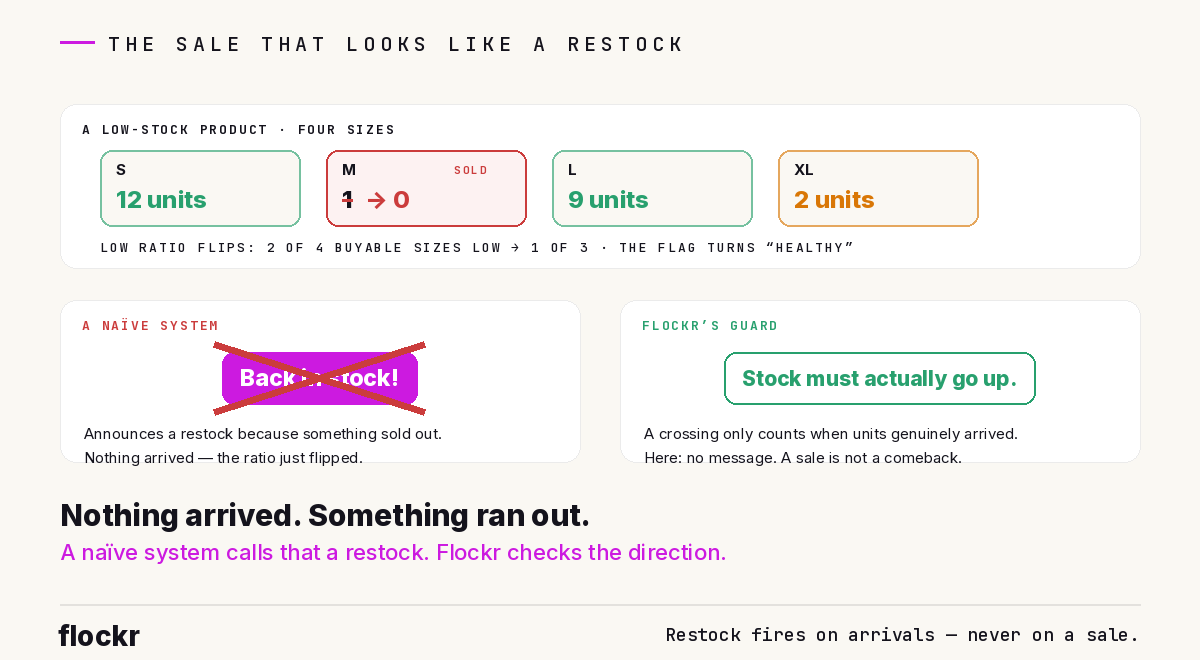
Detection sits at one instant, so it has to be right at that instant — and the ways to be wrong are sneakier than you'd expect. Three guards keep it honest.
A sale can impersonate a restock. This is the counterintuitive one. The low-stock flag is ratio-based — the share of buyable variants that are running low. Now imagine a product with four sizes: S healthy, M down to its last unit, L healthy, XL thin. Two of four buyable sizes are low, so the product is flagged. Then the last unit of M sells. M drops to zero — and drops out of the ratio entirely, because a sold-out size isn't a "buyable variant" any more. The remaining sizes look healthier as a share, the flag flips off, and the product's overall state has just "crossed into health." A naïve system would announce a restock — because something sold out. Nothing arrived; something ran out. So Flockr checks direction: a crossing only counts when the triggering inventory change was an increase. Units genuinely arrived, or no message.
First stock isn't a comeback. A brand-new product receiving its first-ever inventory hasn't returned — it's just launched. There must be a genuine previous stock state to transition from. New arrivals are the newness signal's story, and the two never get confused: launch news and comeback news are different claims, and each is only made when it's the true one.
Trivial restocks filter themselves out. A product that goes from zero to one or two units hasn't meaningfully come back — and elegantly, no special threshold is needed to say so. By the variant-aware rules, one or two units lands the product in low stock, not health, so the crossing never completes and no restock fires. The low-stock model already does the filtering. The message only appears when stock genuinely returns to health.
One practical subtlety worth knowing: inventory updates arrive one variant at a time, so a multi-size delivery trickles in as a sequence of updates. The crossing completes on whichever update tips the whole product back into health; later updates in the same delivery see the product already healthy, and correctly don't re-announce it. One delivery, one piece of news.
News expires
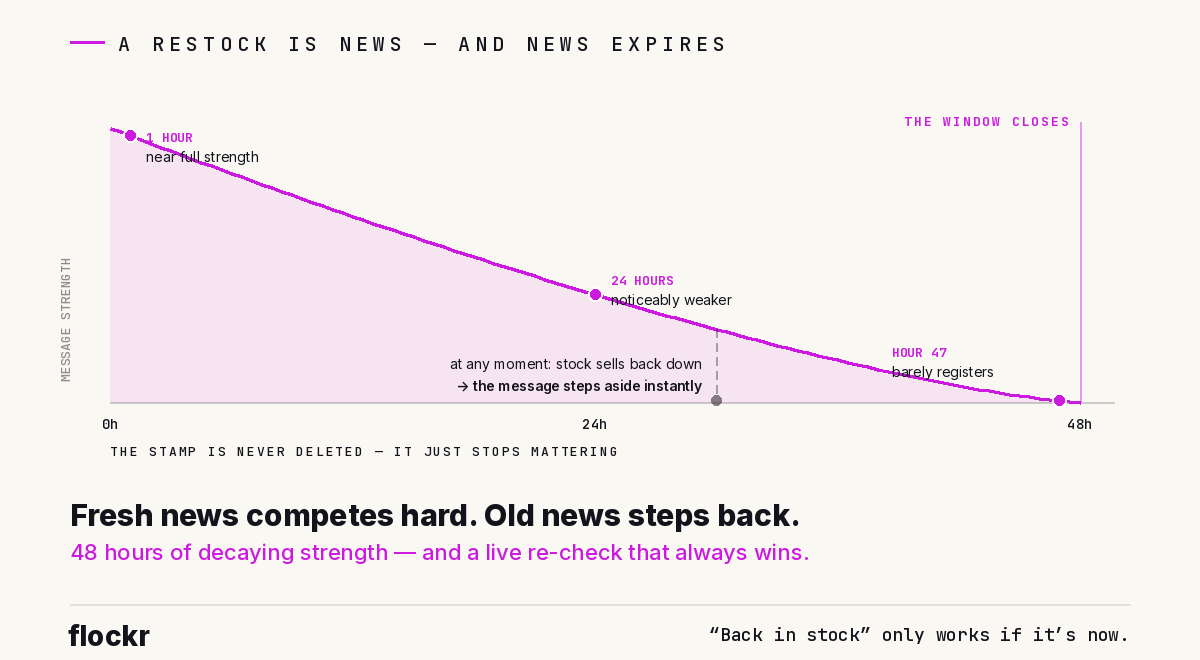
The stamp says a restock happened. Whether it's still worth telling a shopper is a different question, and Flockr re-asks it on every page load. A restock message shows only while all three of these hold: the restock is recent — within the last 48 hours; the product is still in stock right now; and the product is still healthy — the live low flag is off.
The recency isn't a cliff-edge, either. A restock's strength decays steadily across the window: an hour-old restock competes at near full strength, a day-old one is noticeably weaker, and by hour 47 it barely registers — gradually losing slots to fresher signals rather than vanishing mid-browse. When the window closes, the stamp isn't deleted; it just stops mattering. A restock is news, and news expires — the message ages out with it.
The live re-check is what makes the whole thing self-correcting. If a product restocks and then sells back down to low within the window, no tie-breaking rules are needed: the live health check simply fails, the restock message steps aside, and low stock reclaims the product. The event — stamped in the past — and the level — checked live — compose, and the more truthful present state always wins. A shopper will never see "Back in stock!" on a product that's nearly gone again.
That's also the entire relationship between restock and low stock: they're built from the same inventory truth and are mutually exclusive by construction. Low stock requires the live picture to say constrained; restock requires it to say healthy. A product moves cleanly between them as its stock moves — sell down, low stock speaks; replenish, restock takes over; sell down again inside the window, restock steps aside. No precedence rules, no races. Whichever story is true right now is the one the shopper sees.
Where the good news belongs
Restock is a discovery signal: its job is to re-engage shoppers with a product they — or others — previously couldn't buy. So it appears where discovery happens: product pages, listing and category pages, search results, recommendation carousels. And it deliberately doesn't appear in the late funnel — not in the cart, not in the cart drawer, not at checkout. A shopper who already has the product in their bag doesn't need telling it's back; "it's back" adds nothing to someone who has already decided. That's a narrower footprint than low stock, which is allowed everywhere — scarcity keeps working on a committed shopper; a comeback announcement doesn't.
Where it is eligible, restock competes near the top of the pecking order. Like low stock, it's hard inventory evidence rather than a soft behavioural trend, and "Back in stock" carries an extra credit for being an unusually crisp, unambiguous claim. It scores strongest early in the journey — browsing, exploring — and fades in relevance as a shopper approaches purchase, which is exactly the shape a discovery signal should have.
One distinction worth drawing, because the phrase "back in stock" usually means something else in e-commerce: this is not a back-in-stock alert service. Alert apps notify the handful of shoppers who found the product sold out and took the trouble to register an email. Flockr's restock is on-site messaging — the storefront itself announces the return, to every shopper browsing, the moment it's true. The shopper who looked last week and just came back to check sees it. The shopper who never knew it had gone sees a product with fresh momentum behind it. Nobody had to sign up.
The moment, caught
Most storefront messages describe a state, and states sit still long enough to be read. A restock doesn't — it's a crossing, visible for one instant, in one place, and gone. What it takes to say "Back in stock" honestly is everything above: detection at the only moment the transition exists, a direction check so a sale can't impersonate an arrival, a launch check so first stock isn't a comeback, self-filtering so a token top-up doesn't count, a 48-hour half-life so old news doesn't linger, and a live re-check so the message steps aside the moment it stops being true.
The reward is the rare message shoppers are actually pleased to see — shown at the one time it's genuinely news. If you'd like to see what your own catalogue's comebacks would say, the social proof messaging page walks through it, or book a walkthrough on a real store.