
Why that product? Why that message?
Every team running storefront messaging eventually asks the same two questions. Most vendors answer with reassurance. Flockr answers with a panel: open the Inspector on any live page of your store and watch every decision explain itself.
Sooner or later, someone on your team looks at a product tile and asks the question. Why did that product get a message? And why that one? Sometimes it's curiosity. Sometimes it's a merchandiser who expected a different product to be shouting. Sometimes it's a sceptical stakeholder who wants to know what, exactly, this system is doing to their storefront.
Most vendors answer with reassurance. The algorithm optimises for engagement. The model learns what works. Trust it. These are requests, not answers: they name no product, show no evidence, and leave nothing to check.
Flockr's answer is a feature. Open the Flockr Inspector on any live page of your own store and it shows you every decision being made on that page, as it's made, with the reasoning attached. Every customer has it. This post is a walk through what it shows, because we think the fact that it exists says as much about the platform as anything else we've written.
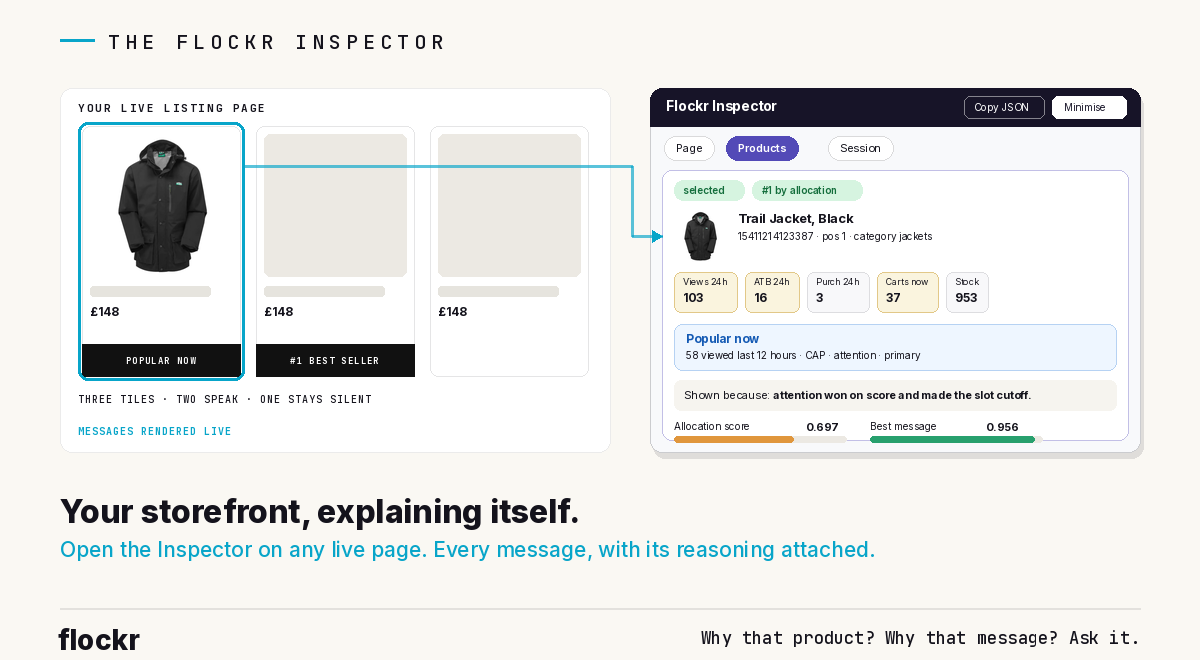
Every message, with its reasoning
Open the Inspector on a listing page and switch to the product view. For any product on the page, it shows the live inputs first: views, add-to-bags and purchases over the last 24 hours, active carts right now, current stock. The numbers behind every claim, on the page where the claim is being made.
Then the decision. The message being shown, with its lineage: which signal family it came from, which placement it holds. And above all, the sentence that answers the question this post is named after, in plain English: "Shown because: attention won on score and made the slot cutoff."
That sentence is the Inspector's centre of gravity. Not a score dump, not a shrug towards a model: a verdict a merchandiser can read in three seconds. The message won, and here is what it won on.
For whoever wants the depth, it's all underneath. Every product's slot is a contest between every true claim available, and the Inspector shows the whole field: each candidate message scored for proof, freshness and fit to the moment, the strongest total winning. On this product, five candidates were eligible. Attention won at 0.956. Add-to-bag intent ran it close. And at the bottom of the field sits a detail we couldn't have staged better: yesterday's restock, still true, scoring 0.588 with its proof down at 0.078, because a restock decays across its 48-hour window exactly as designed. The mechanics this blog keeps describing in diagrams are simply visible here, running.
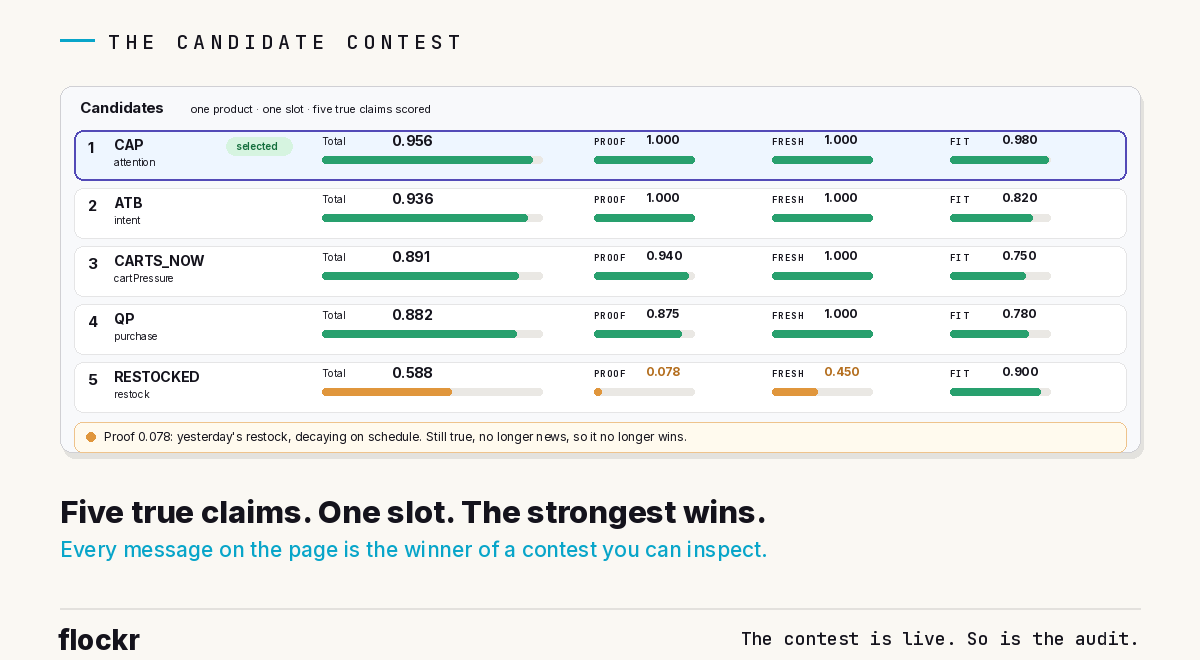
The whole vocabulary, one winner
Step back from the five eligible candidates and the picture gets more interesting, because eligibility itself is a decision the Inspector lets you audit. Flockr's message vocabulary is wide: attention, intent, purchase, cart pressure, restock, scarcity, newness, momentum, rating, rank. On any given product, on any given page load, each claim is in one of three states, and the panel accounts for all of them.
Some claims aren't true right now, so they never enter the contest. This product holds 953 units, so there is no scarcity message to make. It isn't new, so no newness claim. No current acceleration, so no momentum. Nothing about this is a failure; it's the silence-when-unearned principle doing its job, and the Inspector shows the silence with its reason attached.
Some claims are true but lost, fairly, on score. And one wins the slot. On this page load, that's attention. The same product also holds a rank placement, "#5 best seller in sets", which runs as its own contest for its own slot.
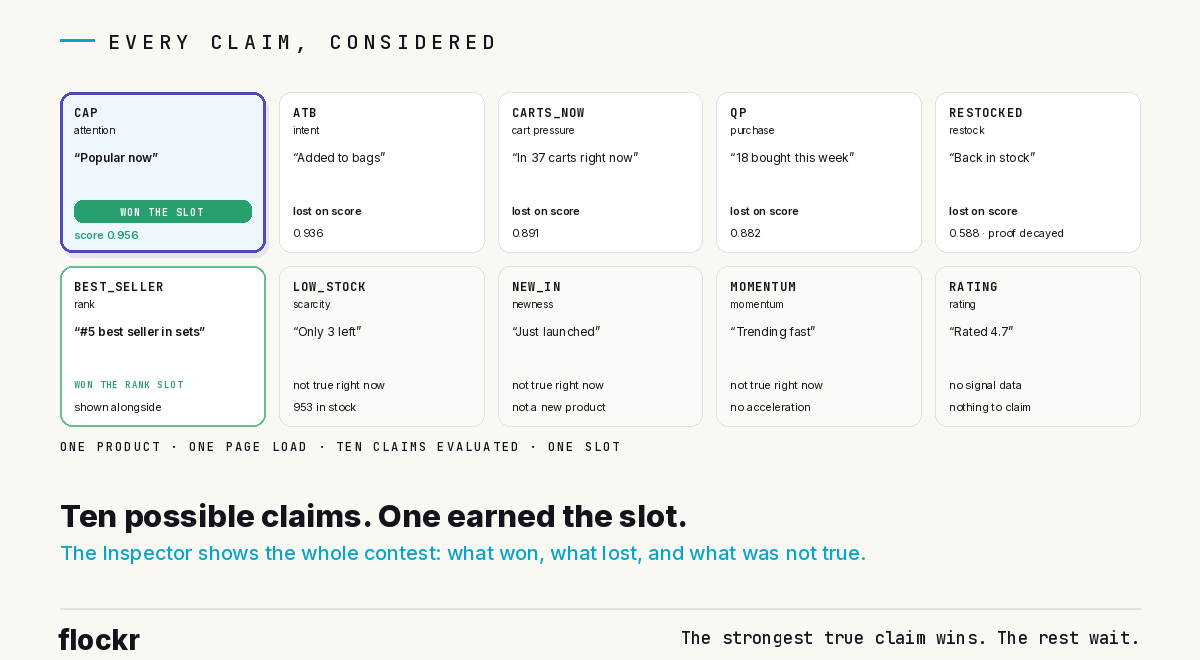
The grid view of that is the honest anatomy of a single message: ten possible claims, four not true, four outscored, one rank winner, one slot winner. When a client asks "why that message?", this is the full answer, and it's available for every product on every page of their own store.
Why not is the harder question
Any tool can explain what it did. The rarer transparency, and the one we're proudest of, is that the Inspector explains what it didn't do.
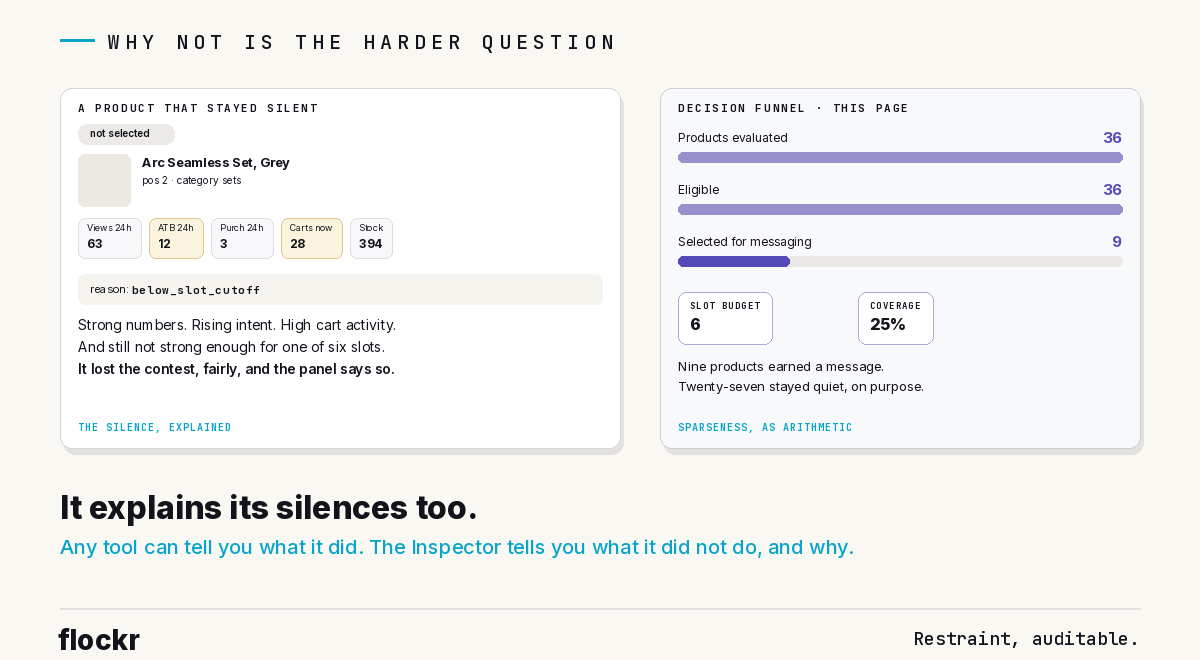
Take the product two tiles along. Its numbers are genuinely strong: rising add-to-bag intent, high cart activity. And it shows no primary message at all. On most platforms, that's a support ticket. In the Inspector, it's one line: reason: below_slot_cutoff. It competed, it lost to stronger claims on other products, and the panel says so. The silence isn't a bug or an oversight; it's a decision, with a name.
The page view completes the picture with the arithmetic. On this listing page: 36 products evaluated, 36 eligible, 9 selected for messaging, against a slot budget of 6 primary slots. Coverage: 25% of visible products. The every-surface post claimed that pages stay deliberately sparse, one message per slot, most products silent. Here the claim stops being a claim. It's a funnel you can read, on your own page, today. The page view even shows the strategy reasoning: on this load, comparison behaviour was detected and diversity filtering applied, so the messages spread across genuinely different products rather than piling onto one.
Who it's for, and what it says about us
In practice the Inspector gets used three ways. Merchandisers answer their own "why is that jacket quiet?" without raising a ticket. E-commerce teams verify behaviour after a launch, a range change, or a config edit, on the live site rather than in a report. And sceptical stakeholders get shown the machine mid-decision, which tends to end the scepticism faster than any deck. For the questions the panel doesn't answer at a glance, Signal is the other half of the pair: the Inspector shows the decision; Signal answers questions about it.
It goes deep, too. The same panel that gives a merchandiser one plain sentence will give a technical team the low-stock arithmetic (30 of 100 in-stock sizes running low on this product, so no scarcity claim), the per-signal states, and a full JSON export of the page's decisions, one click, for whatever analysis you want to run.
And there's a reason we built it that has nothing to do with support tickets. Everything this blog publishes makes checkable claims: attribution that calls itself observational, thresholds published in full, messages that stay silent when unearned. A system confident in its own rules can afford to show them running. The Inspector is that confidence as a feature: not a document about how Flockr works, but Flockr working, watchably, on your own storefront.
One more thing it shows, by what it doesn't contain: products and signals, never people. There is no shopper identity anywhere in the panel, because there is none in the system. The transparency goes all the way down, and there's nothing at the bottom to hide.
Trust, inspected
"Trust the algorithm" is a request. "Here is the algorithm" is an answer. We have not found another platform that lets a retailer's team inspect the live decision behind every message on their own storefront, selections and silences alike.
If you're a Flockr customer, the Inspector is already yours: open it on any page and ask your two questions. If you're not, and you'd like to see a storefront explain itself, the demand intelligence page walks through the platform, or book a walkthrough and we'll open the panel on a live store.